> ## Documentation Index
> Fetch the complete documentation index at: https://julius.ai/docs/llms.txt
> Use this file to discover all available pages before exploring further.
# Overview
> Learn how to integrate Julius into your Slack workspace for seamless data analysis and team collaboration directly in your communication channels.
## What is Julius Slack Agent?
The **Julius Slack Agent** brings Julius AI's data analysis capabilities into your Slack workspace. Query databases, run analysis, generate visualizations, and share insights without leaving Slack.
Once installed, Julius is available across your entire workspace, enabling
real-time collaboration and data-driven discussions in any channel.
## Key Features
* **Direct Access:** Use Julius AI in Slack without switching between applications
* **Team Collaboration:** Share analyses and insights instantly with your team
in channels or threads
* **Context Preservation:** Keep all data discussions and results in one
searchable place
* **Real-time Analysis:** Query your connected databases and get instant results
in Slack
* **Automated Reporting:** Schedule notebook results to post automatically to
channels
* **Natural Language Queries:** Ask questions in plain English - no SQL or
coding required
* **Cross-platform Continuity:** Move conversations between Julius web and Slack freely
## Overview
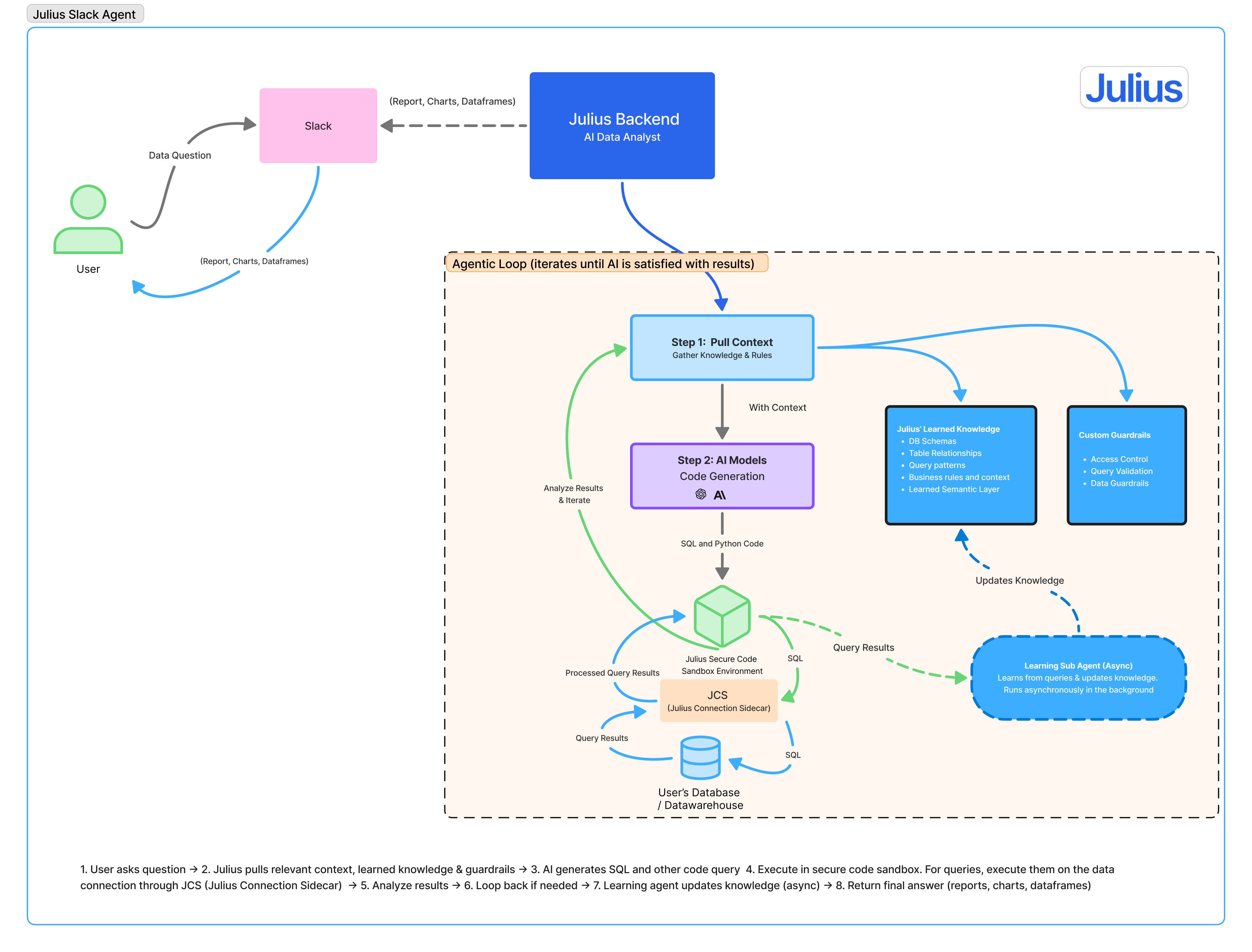
When you send a message to Julius in Slack, Julius will:
1. Create a new chat thread in Julius
2. Connect to any necessary data sources
3. Will write the necessary SQL, Python, or other code needed to answer your question
4. Run the code to complete the analysis
5. Return the results back to Slack
You can then add any follow up questions to the thread, and Julius will repeat steps 2-5.
 ## Feature Walkthroughs
Query all your connected databases directly from Slack conversations
Automatically send a high level report of notebook runs directly to slack.
## Frequently Asked Questions
No. Each Slack thread is treated as a **separate Julius chat**, and the context for Julius is contained within that individual thread.
This is different from **Learned Information** and **Custom Agents**, where knowledge can persist across threads via their respective data connectors.
### Security & Privacy
Visit our Security & Trust Center for detailed information about Julius's
security practices and compliance certifications.
## Getting Started
Follow our step-by-step setup guide to get Julius running in your Slack workspace.
Complete installation and configuration guide for Julius Slack Agent
***
Need help or have questions? Contact
[**team@julius.ai**](mailto:team@julius.ai) for support with your Slack
integration.
## Feature Walkthroughs
Query all your connected databases directly from Slack conversations
Automatically send a high level report of notebook runs directly to slack.
## Frequently Asked Questions
No. Each Slack thread is treated as a **separate Julius chat**, and the context for Julius is contained within that individual thread.
This is different from **Learned Information** and **Custom Agents**, where knowledge can persist across threads via their respective data connectors.
### Security & Privacy
Visit our Security & Trust Center for detailed information about Julius's
security practices and compliance certifications.
## Getting Started
Follow our step-by-step setup guide to get Julius running in your Slack workspace.
Complete installation and configuration guide for Julius Slack Agent
***
Need help or have questions? Contact
[**team@julius.ai**](mailto:team@julius.ai) for support with your Slack
integration.